

The tablet market in 2026 has settled into a clear hierarchy, and the good news is that every tier has a genuinely excellent option. Whether you’re editing 4K video on a plane or reading on the couch, the right tablet depends less on brand loyalty and more on what you actually do with the thing. Here are the ones we’d recommend.
Quick Picks:
Best for Getting Real Work Done: iPad Pro M4 (13-inch) — ~$977 — The closest a tablet has come to replacing a laptop, with a display that makes everything else look washed out.
Best for Drawing and Creative Work: Samsung Galaxy Tab S10 Ultra — ~$685 — A massive, gorgeous AMOLED canvas with an S Pen that feels closer to real media than any other stylus.
Best for Everything Else: iPad Air M3 (13-inch) — ~$799 — Ninety percent of the Pro’s capability at sixty percent of the price. The one most people should actually buy.
Best for Reading and Casual Use: Amazon Fire Max 11 — ~$150 — Absurdly good for the money if you live in the Amazon ecosystem.
Best for Getting Real Work Done: iPad Pro M4 (13-inch)
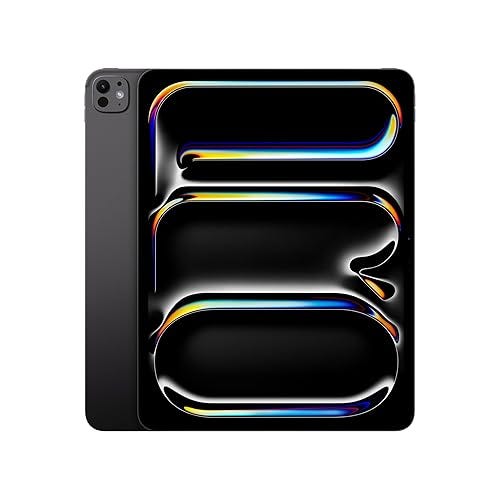
The 13-inch iPad Pro with the M4 chip is the tablet against which all others are measured, and it earns that position. The Ultra Retina XDR display — a tandem OLED panel — hits 1,000 nits of full-screen brightness and 1,600 nits peak HDR, which makes color-critical work genuinely viable on a tablet for the first time. The M4 chip handles 4K ProRes video editing in Final Cut Pro without stuttering, and the 16GB of RAM in the 512GB and higher configurations means you can run desktop-class apps in Stage Manager without the aggressive background app purging that plagued earlier iPads.
At 5.1mm thick and just under 1.28 pounds, it’s thinner than an iPhone and lighter than most legal pads. Pair it with the Magic Keyboard and Apple Pencil Pro, and you have a setup that can genuinely replace a MacBook Air for many workflows — though the accessories push the total cost past $1,800, which is worth acknowledging. Battery life runs about 10 hours of mixed use, which tracks with Apple’s claims. The Thunderbolt/USB 4 port means you can connect external displays and fast storage, closing another gap with laptops.
The catch, as always, is iPadOS. If your work lives in a browser and a few Pro apps, the iPad Pro is unbeatable hardware. If you need true file system access, overlapping windows without fuss, or niche professional software, you’ll still hit walls. But for the specific people who know they want this — designers, video editors, architects reviewing plans, executives who travel constantly — nothing else comes close.
Best for Drawing and Creative Work: Samsung Galaxy Tab S10 Ultra
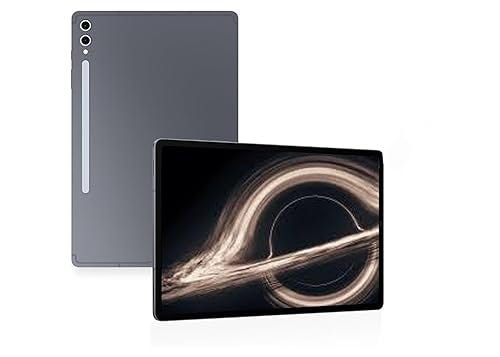
Samsung’s Galaxy Tab S10 Ultra is a different kind of premium tablet than the iPad Pro. Where Apple optimizes for thinness and ecosystem control, Samsung goes for sheer screen real estate and versatility. The 14.6-inch Dynamic AMOLED 2X display is enormous — 2960 x 1848 resolution, 120Hz adaptive refresh, and 930 nits peak brightness — and it makes the tablet feel less like a device and more like a digital drafting table. For illustrators, concept artists, and designers who work in Clip Studio Paint, Sketchbook, or the surprisingly capable Samsung Notes, this is the best canvas you can buy.
The included S Pen has essentially zero perceptible latency thanks to AI-based prediction, and it supports 4,096 levels of pressure sensitivity. It feels meaningfully different from the Apple Pencil Pro — less precise on the nib tip, but more natural in the way pressure translates to stroke weight, which matters enormously for freehand drawing. The MediaTek Dimensity 9300+ processor and 12GB of RAM handle large layered files without choking, and the 11,200mAh battery delivers 12-14 hours depending on workload.
The case for the Tab S10 Ultra over the iPad Pro comes down to two things: the bigger display and the S Pen’s drawing feel. If you’re primarily a visual artist, or you want split-screen multitasking on a screen large enough to make it actually useful, Samsung wins. Android’s tablet app ecosystem still lags behind iPadOS — DeX mode helps, but it’s a workaround, not a solution — and the tablet is physically large enough to be awkward on a cramped airplane tray. But in a studio or at a desk, it’s spectacular.
Best for Everything Else: iPad Air M3 (13-inch)
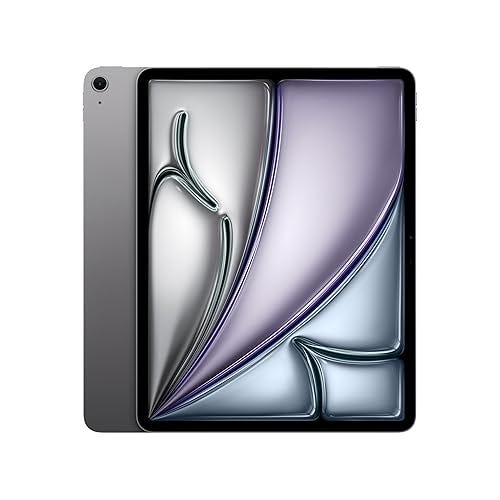
Here’s the uncomfortable truth about the iPad Pro: most people don’t need it. The 13-inch iPad Air with the M3 chip has a Liquid Retina display (not OLED, but still excellent at 2732 x 2048 and 600 nits), the same M3 chip that powered MacBook Pros not long ago, and support for Apple Pencil Pro and the Magic Keyboard. It runs every iPadOS app without compromise, handles video editing and illustration capably, and costs $500 less than the Pro. For students, professionals who use their tablet as a secondary device, and anyone who wants a big, beautiful screen for media consumption and occasional productivity, the Air is the rational choice.
The differences from the Pro are real but narrow. You lose the OLED display (the Air’s LCD is still very good, just not “stare at it and forget it’s a screen” good), the ProMotion 120Hz refresh (the Air is 60Hz, which is noticeable when scrolling but not dealbreaking), and the Thunderbolt port (the Air has USB-C at 10Gbps). You also get 8GB of RAM instead of 16GB, which means heavier multitasking can trigger more background app reloads. In practice, unless you’re doing sustained pro-level creative work, you will not notice.
At $799, the 13-inch Air occupies the sweet spot where capability, screen size, and price all intersect. It’s the tablet we’d recommend to most people who ask “which iPad should I get?” without a specific professional use case in mind.
Best for Reading and Casual Use: Amazon Fire Max 11
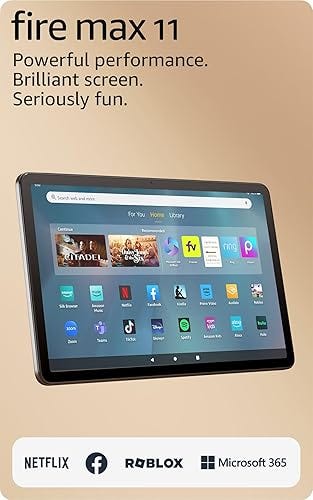
The Amazon Fire Max 11 exists in a different universe from the tablets above, and that’s precisely the point. At ~$150, it’s less than a fifth the price of the iPad Pro, and for what most people actually do with a tablet — streaming video, reading, browsing, light gaming, video calls — it’s more than good enough. The 11-inch 2000 x 1200 display is bright and sharp at this price point, the aluminum chassis feels far more premium than any Fire tablet before it, and the battery comfortably lasts 13-14 hours of reading or video playback.
The trade-offs are obvious and honest. The MediaTek MT8188J processor is adequate, not fast — expect occasional stutter in heavy multitasking, and forget about serious photo or video editing. The 4GB of RAM keeps things tight. And you’re in Amazon’s ecosystem: Fire OS is a heavily skinned Android fork that funnels you toward Amazon’s app store, Kindle, Prime Video, and Alexa. You can sideload the Google Play Store, but it’s a workaround, not a feature. The cameras are mediocre, which is fine because nobody should be taking photos with a tablet.
Where the Fire Max 11 earns its spot is in the gap between phones and premium tablets. If you want a dedicated couch device for reading Kindle books, watching shows in bed, or handing to a kid on a road trip — and you don’t want to risk a $1,300 iPad Pro in those scenarios — this is the obvious answer. It’s the tablet you buy without anxiety and use without pretense